Managing Employee Data Access Levels: The 2026 Guide to Secure Workforce Infrastructure
By Humae · 31 May 2026
managing employee data access levels
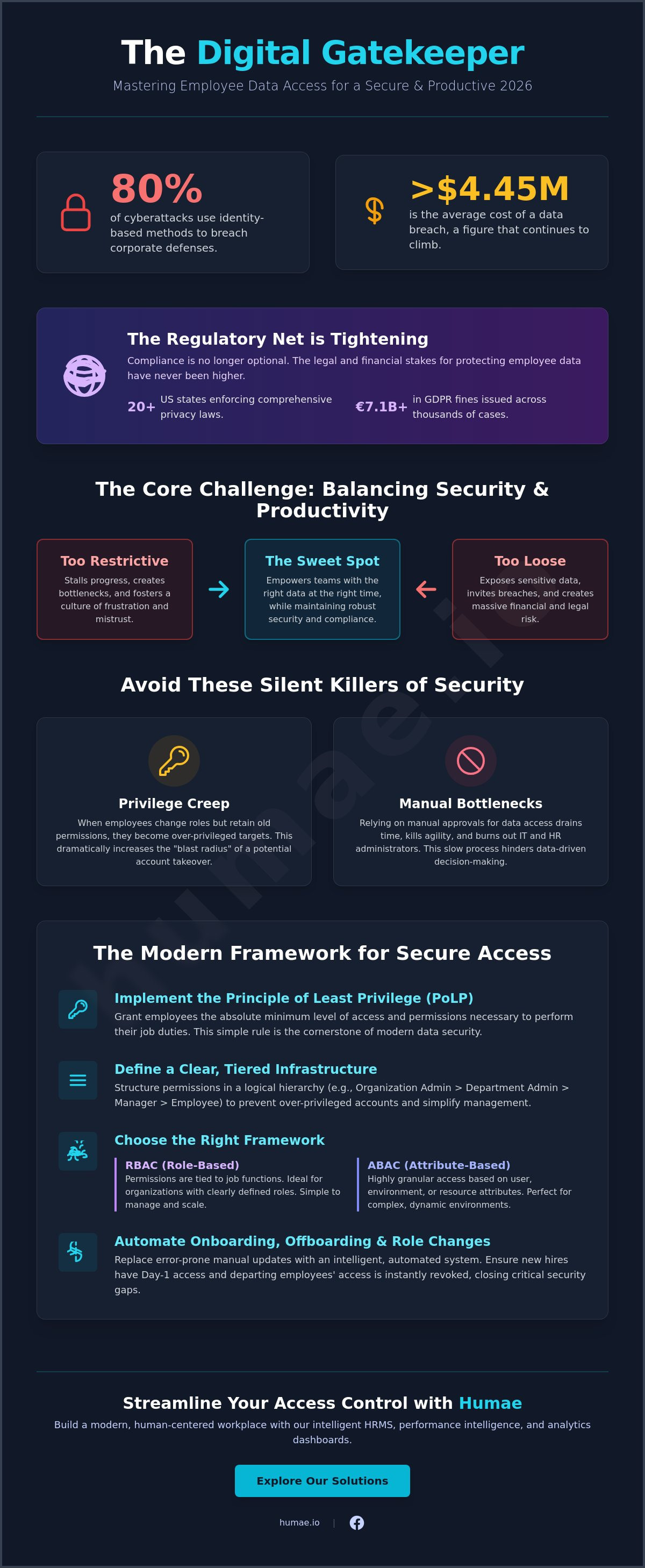
Did you know that 80% of cyberattacks now utilize identity-based methods to breach corporate defenses? It's a startling reality in 2026, where the average cost of a data breach has climbed past $4.45 million. Effectively managing employee data access levels isn't just a technical chore anymore; it's the heartbeat of your company's security and trust. With 20 US states now enforcing comprehensive privacy laws, including new 2026 regulations in Indiana and Kentucky, the stakes for your workforce infrastructure have never been higher.
We know the headache of manual permission updates that drain your time and the constant worry that a single over-privileged account could lead to a leak. You deserve a system that empowers your team instead of slowing them down with red tape. This guide promises a clear path toward balancing security and productivity through a modern, AI-enhanced framework. We'll explore how to automate your onboarding workflows, maintain strict compliance with GDPR and CCPA, and build a scalable permission model that grows as fast as you do.
This resource is brought to you by Humae, your partner in building a modern, human-centered workplace through our intelligent HRMS, performance intelligence, and analytics dashboards. To explore our full suite of tools, visit our home page or connect with our community on Facebook.
Key Takeaways
- Transform your security strategy by treating data access as the digital gatekeeper of your team’s intelligence and safety.
- Identify the ideal balance between Role-Based and Attribute-Based controls to ensure your permissions scale alongside your hiring.
- Streamline managing employee data access levels using a clear, tiered infrastructure that prevents over-privileged accounts and data leaks.
- Implement the Principle of Least Privilege to safeguard sensitive information without sacrificing the speed of data-driven decision-making.
- Explore how performance intelligence and automation can replace manual updates, creating a more human and efficient onboarding experience.
Why Managing Employee Data Access Levels is Critical for Modern Teams
Think of your company's data as a high-security vault that doubles as a library. For your team to innovate, they need the books. To stay safe, you need to lock the doors. In this context, managing employee data access levels acts as the digital gatekeeper of your organizational intelligence. It's the mechanism that determines who can view sensitive performance metrics, personal contact details, or proprietary project plans. Getting this right requires a delicate balance. You must protect Personally Identifiable Information (PII) to meet legal standards while providing the speed necessary for data-driven decisions. If your permissions are too loose, you risk a breach; if they're too tight, you create a culture of frustration and stalled progress.
The regulatory environment in 2026 makes this balance a non-negotiable priority. With 20 US states now enforcing comprehensive privacy laws, including recent additions like Indiana and Kentucky, the legal net is tightening. California remains a pioneer, granting employees full privacy rights that mirror consumer protections. Failing to secure this data isn't just a tech oversight. It's a massive financial risk. With GDPR fines totaling over €7.1 billion across 2,500 cases by early 2026, the cost of negligence is clear. Beyond the numbers, there's a human element. Over-restricting data often signals a lack of trust. When employees feel monitored or blocked from resources they need to succeed, engagement drops. Access should feel like an invitation to contribute, not a barrier to entry.
The Cost of Poor Access Management
One of the quietest killers of security is "privilege creep." This happens when employees change roles or departments but retain their old permissions. Over time, a long-tenured staffer might have keys to every room in the building, even though they only need one. This increases the "blast radius" of a potential breach. Since 80% of cyberattacks now utilize identity-based methods, these over-privileged accounts are prime targets. Beyond security, poor management creates operational drag. If a marketing manager has to wait three days for an IT admin to approve access to a simple analytics dashboard, your agility disappears. Manual approval bottlenecks don't just slow down work; they burn out your administrators.
Access Management as a Cultural Value
Modern organizations treat access as a core cultural pillar. By implementing a centralized workforce management infrastructure, you build a foundation for secure, transparent growth. This approach uses the "need-to-know" principle to protect privacy without hiding the big picture. Utilizing frameworks like Role-Based Access Control ensures that permissions are tied to responsibilities rather than individual whims. When access management is automated and logical, it becomes an enabler. It ensures that on day one, a new hire has exactly what they need to feel empowered and trusted, setting the stage for long-term success.
This article is powered by Humae, the intelligent HRMS designed to simplify your workforce operations. Ready to streamline your team's growth? Return to our home page or stay updated by following us on Facebook.
Defining the Core Tiers of Data Access and Permissions
Effective workforce management starts with a clear hierarchy. Managing employee data access levels isn't about building walls; it's about creating a structured flow of information that keeps the right people informed and the wrong eyes out. In 2026, a four-tier system has emerged as the gold standard for organizations that value both speed and security. This structure ensures that every team member has the tools they need without exposing the company to unnecessary risk.
- Tier 1: Organization Administrator: These users hold the keys to the kingdom. They manage global system configurations, security settings, and high-level integrations. This role is usually reserved for IT directors or senior HR leaders.
- Tier 2: Product/Department Admin: These administrators have unrestricted access within specific modules. For example, a recruitment lead might have full control over the Applicant Tracking System but limited visibility into the performance intelligence dashboard.
- Tier 3: Limited/Manager Access: This tier is designed for team leaders. It provides visibility into direct reports, allowing managers to approve time off, review performance notes, and track OKRs without accessing sensitive data for the entire company.
- Tier 4: Standard/Employee Access: This is the foundation of self-service. Employees can manage their personal profiles, view their own documents, and access the company directory.
Establishing these tiers early helps prevent "permission bloat" and ensures your infrastructure remains lean. If you're looking to see how these levels function in a real-world environment, exploring our HRMS features can provide a practical look at automated role assignments.
Standardizing Roles Across the Organization
Every role in your company should have a predefined permission profile from day one. This proactive approach eliminates the guesswork for IT and HR when onboarding new hires. You should clearly distinguish between "View-Only" and "Editor" permissions. A manager might need to view a report but shouldn't necessarily have the power to edit a salary field. For temporary projects or audits, use time-bound "Special Access" instead of permanent upgrades. High-performing organizations often model their internal standards after Northeastern University's Data Access Policy, which emphasizes strict authorization and data classification as a baseline for trust.
Managing Sensitive Data Fields
Managing employee data access levels requires a granular focus on specific data fields. Information like home addresses, health records, and performance intelligence must be shielded behind field-level security. This means a manager might see a team member's job title but not their private medical notes or specific salary history. Your employee directory settings play a vital role here; you can decide which contact details are public for collaboration and which remain private for HR eyes only. This dual-layer approach protects individual privacy while fostering a culture of transparency.
This article is powered by Humae, the intelligent HRMS designed to simplify your workforce operations. Ready to streamline your team's growth? Return to our home page or stay updated by following us on Facebook.
RBAC vs. ABAC: Choosing the Right Framework for Your Workforce
Choosing the right structural backbone is the next step after defining your access tiers. Most organizations rely on two primary frameworks to govern their data: Role-Based Access Control (RBAC) and Attribute-Based Access Control (ABAC). While RBAC assigns permissions based on a person's job title or department; ABAC takes a more granular approach. It looks at specific characteristics like geographic location, years of tenure, or current project status. Modern hris systems often utilize a hybrid model. This gives you the stability of predefined roles with the flexibility of dynamic attributes. This combination ensures that managing employee data access levels remains seamless and secure as your team grows more complex.
The choice between these frameworks isn't just about security; it's about scalability. Manual role assignments work well when you have fifty employees, but they become a bottleneck at five hundred. Switching to attribute-based logic allows your system to make "intelligent" decisions on your behalf. It removes the human error factor from the equation. When your infrastructure understands the context of a user's request, it can grant or deny access in milliseconds without an admin ever lifting a finger.
The Power of RBAC for Startups
For companies in early growth stages, RBAC is often the best starting point. It offers simplicity and speed of implementation. You can quickly standardize permissions for common roles such as "Recruiter," "Manager," or "Operations Lead." This prevents the common "Everyone is an Admin" trap. In small teams, it's tempting to give everyone full access to move faster, but this creates massive security holes. RBAC provides a clean, manageable foundation that keeps your data safe while your focus is on scaling the business.
Moving Toward Attribute-Based Logic
As your organization becomes more complex, you'll need more than just job titles to manage access. Managing employee data access levels through attributes means your security policies react in real-time to changes in your workforce. This framework uses "If/Then" rules to automate permissions. For example; if an employee is based in the London office, they automatically see UK-specific benefit documents. By linking access directly to your employee directory, you reduce manual errors. AI now plays a role here too; suggesting permission updates as an employee's role evolves or as they join new cross-functional projects.
This article is powered by Humae, the intelligent HRMS designed to simplify your workforce operations. Ready to streamline your team's growth? Return to our home page or stay updated by following us on Facebook.
Best Practices for Implementing a Secure Access Strategy
Strategy is only as good as its execution. While defining tiers and frameworks provides the blueprint, the real work of managing employee data access levels happens in the day-to-day operations of your workforce infrastructure. In an era where 80% of breaches involve compromised identities, your implementation must be dynamic. It's time to move away from "set and forget" permissions and embrace a lifecycle approach that evolves alongside your team. By following a structured implementation path, you ensure that security becomes a seamless part of the employee experience rather than a hurdle to overcome.
To build a resilient system, start with these five essential steps:
- Step 1: Conduct a Data Audit. You can't protect what you haven't mapped. Identify exactly where sensitive information like salary data, health records, and performance intelligence lives within your system.
- Step 2: Apply the Principle of Least Privilege. Ensure every user has the absolute minimum access required to perform their specific tasks.
- Step 3: Automate the Access Lifecycle. Link your hiring and departure processes directly to your permission engine to eliminate manual delays.
- Step 4: Establish a Recurring Review Schedule. Perform quarterly or bi-annual audits to catch "privilege creep" before it becomes a liability.
- Step 5: Mandate Multi-Factor Authentication (MFA). Require MFA for all administrator tiers to add an extra layer of defense against credential theft.
The Principle of Least Privilege (PoLP)
Automating the Access Lifecycle
Manual offboarding remains the number one security hole in modern HR. When an employee leaves, every minute their access remains active is a minute of unnecessary risk. The most effective way to close this gap is by connecting your applicant tracking system directly to your core HRMS. This ensures that when a candidate is hired, their profile and permissions are staged automatically. More importantly, when an employee's status changes to "terminated," the system can instantly revoke all data access. Setting up automated alerts for unusual access patterns, such as a manager downloading bulk performance data at 2 AM, provides an additional safety net for your organization.
Ready to see how automation can transform your security? Explore our secure HRMS features to see these best practices in action.
This article is powered by Humae, the intelligent HRMS designed to simplify your workforce operations. Ready to streamline your team's growth? Return to our home page or stay updated by following us on Facebook.
Streamlining Access Control with Humae’s Intelligent HRMS
Building a secure workforce infrastructure doesn't have to feel like a battle against your own software. Humae transforms the way you approach managing employee data access levels by replacing manual friction with intelligent automation. Our platform acts as a bridge between high-level security needs and the daily reality of your team's workflow. By integrating permissions directly into an ai-powered hr platform, we ensure that data remains protected without becoming a bottleneck for productivity. It's about giving your people the right keys at the right time, every time. This approach allows your organization to scale with confidence, knowing that your digital boundaries are as flexible as your culture.
Transparency is vital for trust. Humae's analytics dashboards provide a real-time view of your organization's permission landscape. You can instantly see who holds administrative rights, identify potential "privilege creep," and ensure your security policies are being followed across every department. This visibility allows you to lead with confidence. You'll know your workforce infrastructure is both open for collaboration and closed to unauthorized risks. We believe technology should empower managers to lead effectively while providing the peace of mind that sensitive performance intelligence remains in the right hands.
AI-Driven Permission Suggestions
Humae's AI doesn't just store data; it understands the context of your organization. When a team member's role evolves, the system analyzes the shift and suggests updated access levels based on their new responsibilities. This proactive approach significantly reduces the burden on your IT department by automating common requests through intelligent self-service workflows. Managers can approve access with a single click, keeping projects moving without sacrificing security. Additionally, built-in audit logs and automated reporting ensure you're always ready for a compliance review, making managing employee data access levels a stress-free part of your operations.
For organizations that require this level of automation within specialized enterprise environments, you can visit PS WebSolution to learn how they streamline and secure PeopleSoft processes through advanced technology.
Experience the Humae Difference
The future of work is built on a foundation of security and empathy. We invite you to check out our features to see granular access control in action. You can also learn how it works to discover how easy it is to set up your first secure directory. Managing permissions shouldn't be a chore that slows you down. It should be a strategic advantage that helps your team thrive. Join the modern workforce with Humae and experience an HRMS that truly understands the human element of technology.
This article is powered by Humae, the intelligent HRMS designed to simplify your workforce operations. Ready to streamline your team's growth? Return to our home page or stay updated by following us on Facebook.
Future-Proof Your Workforce Infrastructure Today
Building a secure organization in 2026 isn't just about locking down folders; it's about creating a dynamic environment where trust and technology coexist. We've explored how transitioning from rigid roles to flexible, attribute-based logic ensures your team stays agile without compromising safety. By prioritizing the Principle of Least Privilege and automating your onboarding lifecycle, you eliminate the manual bottlenecks that often lead to security gaps. Effectively managing employee data access levels is no longer a back-office burden. It's a strategic pillar that supports your company's growth and protects its most valuable asset: its people.
It's time to trade manual spreadsheets for a platform that works as hard as you do. Humae offers a centralized employee directory and AI-powered performance intelligence, all backed by SOC 2 compliant security to keep your data untouchable. Are you ready to see the difference a human-centered HRMS can make? Empower your team with Humae's secure workforce infrastructure and join the ranks of forward-thinking leaders who put security and experience first. Your team deserves a workspace that is as safe as it is inspiring.
This article is powered by Humae, the intelligent HRMS designed to simplify your workforce operations. Return to our home page or stay updated by following us on Facebook.
Frequently Asked Questions
What is the principle of least privilege in HR?
The principle of least privilege (PoLP) involves granting employees the minimum level of access necessary to perform their specific job functions. In an HR context, this ensures a recruiter can manage the applicant tracking system without seeing the entire company’s payroll or sensitive health records. This strategy is vital for managing employee data access levels because it containment risks and ensures that a single compromised account doesn't expose the entire organization.
How often should I review employee access levels?
You should review employee access levels at least quarterly or bi-annually to prevent the accumulation of unnecessary permissions. Regular audits help identify staff members who have transitioned to new roles but still hold keys to their old departments. High-growth organizations often conduct these reviews more frequently to stay aligned with rapid hiring cycles and internal team shifts, ensuring their workforce infrastructure remains lean and secure.
What is the difference between RBAC and ABAC?
Role-Based Access Control (RBAC) grants permissions based on a person's job title or department; while Attribute-Based Access Control (ABAC) uses specific characteristics like geographic location, tenure, or project status. RBAC is generally simpler to implement for startups. ABAC provides the granular, "if/then" logic required by complex enterprises to automate permissions across different regions and specialized teams.
Can I automate permission changes when an employee is promoted?
Yes, you can automate these changes by linking your HRMS to your organizational hierarchy and role profiles. When a promotion is officially recorded in the system, the platform can automatically trigger a permission update that reflects the new role's requirements. This removes the need for manual IT tickets and ensures your team members have the right tools the moment they step into their new responsibilities.
What are the common mistakes in managing data access?
The most frequent mistakes include granting "Organization Admin" status to too many users and failing to automate the offboarding process. Many businesses also struggle with privilege creep, where long-term employees retain access to systems they no longer use. These oversights create massive security holes that identity-based cyberattacks, which account for 80% of modern breaches, are designed to exploit.
How does access management impact GDPR compliance?
Access management is a fundamental requirement for GDPR because it enforces the principles of data minimization and purpose limitation. By managing employee data access levels strictly, you ensure that personal data is only visible to those who have a lawful reason to process it. This proactive protection helps avoid the severe penalties associated with unlawful data processing, which can reach up to €20 million or 4% of global revenue.
What is the role of an Organization Admin in an HRMS?
An Organization Admin holds the highest level of authority within an HRMS and is responsible for global system configurations and security settings. They oversee the centralized employee directory, manage high-level integrations, and define the permission tiers for the entire company. Because this role has unrestricted access to all modules, it should be limited to a small group of senior leaders to maintain maximum security.